
Auto-cancel Inactive Projects
You've probably encountered this situation before.
You closed a submission and sent the comments to the licensee, and then the project just sat there in the Comments for Licensee folder. For reasons unknown, the licensee failed to add a new submission to the project.
In a perfect world, a licensee will communicate with you when they’ve encountered hurdles due to quality compliance requirements, manufacturer disputes or financial concerns. But we know (especially this year!) that we don't live in a perfect world.
Did you know that Mediabox-PA can monitor and manage inactive projects, so you don’t have to?
Auto-cancel Inactive Projects
Auto-cancel Inactive Projects is a handy feature that, when enabled, warns a licensee that they must update their project by a certain date, or the system will automatically cancel it.
To implement this feature on your site, our team will ask you to decide how many days of inactivity should trigger the warning email, and how many total days of inactivity merits a project's cancellation.
For example, you may feel that 90 days is the maximum time your licensees should need to get any submission ready. We could configure the feature settings so that an automatic email notification is triggered when a project sits in the Comments for Licensee folder for, let’s say, 60 days. The email will warn the project owner that unless they add a new submission before the date displayed (at 90 days of inactivity), the project will be cancelled.
So what happens if an inactive project is automatically cancelled... but then the licensee wants to add a new submission?
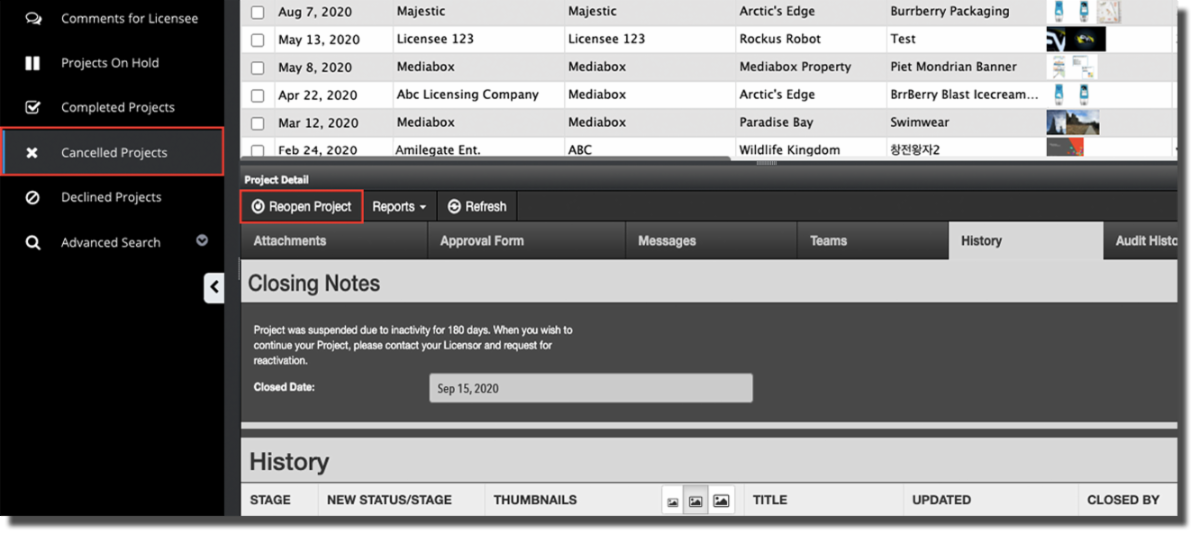
That's up to you! The Closing Notes that display for a project closed due to inactivity read:
“Project was suspended due to inactivity for [x] days. When you wish to continue your Project, please contact your Licensor and request for reactivation.”
If you decide to allow the licensee to proceed with a project that was cancelled due to inactivity, a Lead Reviewer only needs to locate the project in the Cancelled Projects folder and reopen it. This moves the project back to the Comments for Licensee folder and triggers an email notification to the licensee, so they know they may now proceed with their submission.
Wait, what about Seasonal Projects?
Some of your licensees may have projects with planned periods of inactivity, for example seasonal projects where the final design is approved now, but the pre- production samples won’t be submitted until later in the year.
No problem!
For this situation, a Lead Reviewer can move the licensee's project to the Projects On Hold folder. The Projects On Hold folder pauses the "inactivity" timer, so projects will not auto-cancel from this folder. When the licensee lets you know they're ready to ship samples, the Lead Reviewer can simply move the project back to the Comments for Licensee folder.
Can the feature's settings be changed?
Absolutely! Like all system features, your settings can be adjusted whenever you request it. The Mediabox Support Team can change the number of days that trigger the warning emails and/or the project cancellations. In fact, since the Covid crisis began, we’ve had several licensors ask to extend the time settings in support of their licensees whose businesses have been negatively impacted by the pandemic.
The Auto-cancel Inactive Projects feature is just one of many Mediabox-PA tools available to help you efficiently manage the myriad nuances in your licensing program.
If it’s not already enabled on your site and you’re interested in trying it out, shoot us a quick email at [email protected].